
Online Synthesizer
Press a key to play.
Computer keys: ASDFGHJKL white, WETYUOP black · Z/X octave down/up.
Play a free online synthesizer in your browser: two oscillators, ADSR envelope, filter, vibrato and echo, six presets, computer-key and touch play.
About the Online Synthesizer
The online synthesizer is a free synth keyboard that runs in your web browser, with no sign-up. You can play it with your mouse, a touch screen or your computer keys, and shape the sound with waves, an envelope, a filter, vibrato and echo. Every sound is made live in your browser using Web Audio, so no samples are downloaded. Use it as a virtual synthesizer to hear how synth sounds are built, from a sawtooth lead to a warm pad, or to dial in an 80s synth keyboard sound. Start with one of the six presets and change the controls until it sounds right to you.
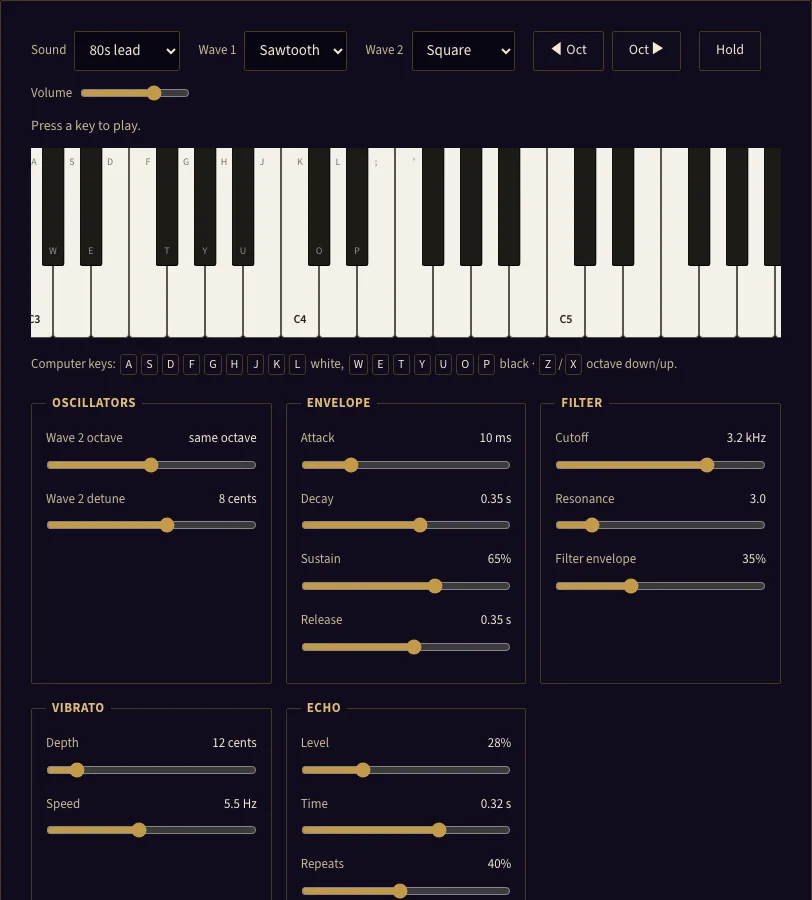
How to use the online synthesizer
- Click, touch or press a key on the page first. Browsers keep sound off until you do this, so the first key press may start the audio.
- Pick a starting sound from the Sound menu: 80s lead, Warm pad, Pluck, Sub bass, Organ or Soft keys.
- Play the keyboard by clicking or touching keys. Slide across keys to glide between notes. On a computer, use A S D F G H J K L for the white keys and W E T Y U O P for the black keys. K is middle C (C4).
- Press Z or X, or use the Oct buttons, to move the keyboard down or up by one octave.
- Set Wave 1 to sine, triangle, sawtooth or square. Set Wave 2 to Off, or to any of the four shapes, then choose its octave and detune it against Wave 1.
- Shape the loudness with Attack, Decay, Sustain and Release. Shape the brightness with Cutoff, Resonance and Filter envelope.
- Add movement with Vibrato (Depth and Speed) and Echo (Level, Time and Repeats).
- Turn on Hold to keep notes sounding after you release the keys. Press Hold again to stop them. Use Volume to set the level.
- Click Copy link to this sound to get a link that holds your whole sound.
The line above the keyboard shows the last note you played and its frequency in Hz. Changing any control switches the Sound menu to Custom.
What is a synthesizer and how does it make sound?#
A synthesizer makes sound by building it from electronic parts instead of playing back a recording. Three stages do most of the work: an oscillator makes the raw tone, a filter shapes its brightness, and an envelope controls how loud it is over time.
The oscillator produces a repeating wave, and the wave shape sets the tone’s colour. This tool has two oscillators, Wave 1 and Wave 2, mixed at equal loudness. Detuning the two by a few cents makes the sound thicker.
The filter removes part of the high frequencies. This tool uses a low-pass filter. The Cutoff sets the point where high frequencies start to fade, and Resonance boosts the sound right at that point. A higher cutoff sounds brighter, and a lower one sounds darker. The Filter envelope opens the cutoff at the start of each note, then lets it fall back, which creates the classic pluck and wow movement.
The envelope shapes loudness over time. This is what makes a note sound like a sharp pluck, a steady organ tone or a slow pad. Two more effects add motion. Vibrato wobbles the pitch slowly, and echo repeats the sound after a set time.
What is ADSR (attack, decay, sustain, release)?#
ADSR is the four-part shape of a note’s volume. It describes what happens after you press a key and after you let it go. The four letters stand for Attack, Decay, Sustain and Release.
Attack is how long the note takes to reach full volume after the key goes down. Here it runs from 2 ms to 3 s. A short attack gives a sharp start, and a long one gives a slow swell.
Decay is the fall from full volume to the sustain level while the key is still held. Here it runs from 20 ms to 3 s.
Sustain is the level the note holds while you keep the key down, from 0 to 100 %. At 100 % the note stays at full volume. At 0 % the note dies away even while the key is held.
Release is the fade after you let the key go, from 20 ms to 4 s. A long release lets notes ring out, which suits pads.
Frequently asked questions
How do I make an 80s synth sound?
What is the difference between sine, triangle, sawtooth and square waves?
Can I play it with my computer keyboard or phone?
Can I record or save my sound?
Why is there no sound when I press a key?
What tuning does the synthesizer use?
Updated