
Xylophone Online
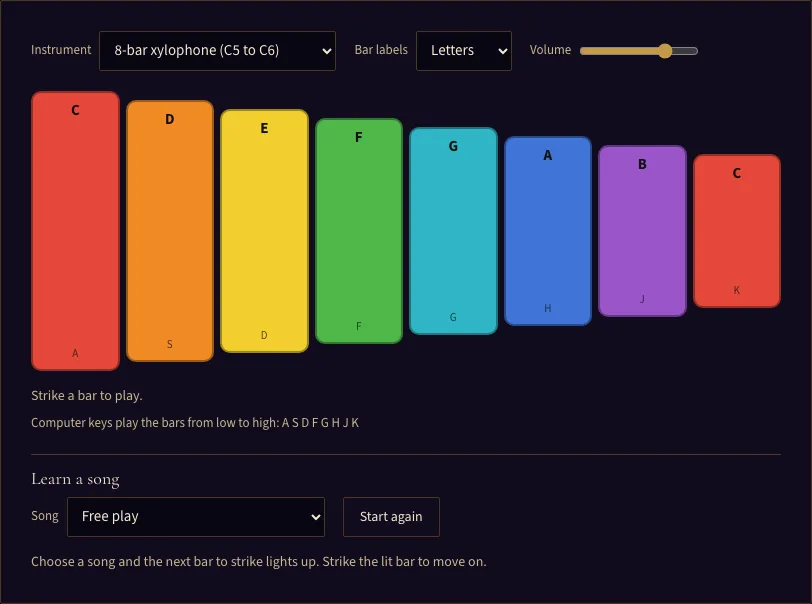
Strike a bar to play.
Computer keys play the bars from low to high:
Learn a song
Choose a song and the next bar to strike lights up. Strike the lit bar to move on.
Play a xylophone online: 8 colored bars or a 25-note glockenspiel, played with mouse, touch or keyboard, plus a learn-a-song mode that lights the next bar.
About the Online Xylophone
The online xylophone on this page is a free virtual xylophone that runs in your web browser, with no sign-up. You can play it by clicking, tapping or sliding across the bars, or by pressing computer keys. It has two instruments: an 8-bar xylophone and a 25-note glockenspiel. All sound is synthesised live in the browser, so nothing is uploaded and no cookies are set by the tool. You can also learn songs one bar at a time: pick a tune and the next bar to strike lights up, so you can follow a melody without reading music. Bars are colored by note name and labeled with letters or Do Re Mi.
How to play the xylophone online
- Click, touch or press any key once on the page. Browsers keep sound off until you do this, so the first press may start the audio.
- Choose the 8-bar xylophone or the 25-note glockenspiel.
- Pick a bar label: Letters, Do Re Mi (solfege), or None.
- Click or tap a bar to play it. Slide your finger or the mouse across the bars to play a run.
- Press the keys A S D F G H J K to play the 8-bar xylophone from the lowest bar to the highest.
- Hover over a bar to see its note name and frequency. The line below the bars shows the last note you played and its frequency in Hz.
- Use the volume slider to adjust the loudness. Choose Start again whenever you want to restart a song from its first note.
- To learn a song, choose one from the list. The next bar to strike lights up with a white outline. Strike it to move on.
Hovering shows the note details, and the line below the bars keeps track of your last note. The tool does not record or export what you play, and it does not support MIDI.
What notes does a xylophone have?#
The 8-bar xylophone in this tool covers the notes of the C major scale, from C5 to C6: C, D, E, F, G, A, B, C. That is one octave, and the two C bars sit at each end. The 25-note glockenspiel covers every chromatic note from G5 to G7, including the sharps and flats in between.
Pitch in this tool follows equal temperament, with A4 set to 440 Hz. In that system, C5 is about 523.25 Hz and C6 is about 1046.5 Hz, because each octave doubles the frequency. Each bar’s length follows the same rule as a real instrument: the longest bar is the lowest note, and the bars get shorter as the notes get higher. Shorter bars vibrate faster, which produces a higher pitch.
How do you play a song on a xylophone?#
A xylophone plays one note at a time, so a melody is a list of bars to strike in order. Each bar is named by the letter of its note, so a tune such as C C G G A A G is read as a row of bar names. On a real instrument, players use two mallets and usually alternate hands, which keeps the rhythm even and lets each hand move to the next bar without a collision.
On this page you can practise the order of the bars first, without worrying about rhythm. Pick a song under Learn a song and strike each lit bar. When you know the route, play the song again from memory, then speed up. For printed letter notes of the same songs, use the Xylophone notes page.
What is the difference between a xylophone and a glockenspiel?#
The main difference is range and the notes they include. The xylophone here has eight bars that follow the white keys of a piano from C to C. The glockenspiel has 25 bars that include every semitone, so it can play the black-key notes too, shown as darker bars.
The sound differs as well. The glockenspiel rings longer and brighter than the xylophone, which has a shorter, woodier attack. Real instruments also differ in build: xylophones usually have wooden bars and glockenspiels usually have metal bars.
Frequently asked questions
Why are the bars different colours and lengths?
Can I play the online xylophone on a phone?
Why can't I hear any sound when I click a bar?
What happens if I strike the wrong bar when learning a song?
Do I have to play a song in time?
Does the tool upload or store anything I play?
Updated