
Chart and sound
Piano keys labeled: printable piano keyboard chart
Piano keys labeled with note names: make a printable labeled piano keyboard (25 to 88 keys) with letters or solfège, octaves, sharps and flats, or blank.
Three separate pages: all 88 keys labeled (in three rows), a large 2-octave keyboard, and a blank worksheet. The labels you choose above are printed.
Download the PDF kit
Free to print and share. No sign-up, no e-mail, no watermark. A4 for most of the world, Letter for the US and Canada; both are black and white, with the fonts embedded.
Quick answer
A full piano has 88 keys: 52 white and 36 black, from A0 (key 1) at the left to C8 (key 88) at the right. The white keys are named with the letters A to G, repeating every octave; the black keys come in groups of two and three and are named by the white key beside them with a sharp (♯) or a flat (♭). Middle C is C4, key 40: the white key just left of the group of two black keys nearest the middle. The keyboard below shows every key with its name and octave number; choose the labels you want, click a key to hear it, and print it.
Piano keys labeled: all 88 keys
A0 to C8 · musictheoryprint.com
Middle C (C4, key 40) · the number after each letter is the octave, which starts on C · black keys: sharp name above, flat name below
Keys 1 to 27: A0 to B2
Keys 28 to 63: C3 to B5
Keys 64 to 88: C6 to C8
Names follow scientific pitch notation (middle C = C4); key numbers count from A0 = 1, so MIDI note number = key number + 20. A4 = key 49 = 440 Hz. musictheoryprint.com/piano-keyboard-labeled
Piano keys labeled: 2 octaves, large print
C4 to C6 · musictheoryprint.com
Middle C (C4, key 40) · black keys: sharp name above, flat name below
Keys 40 to 64. The same labels as the 88-key chart, printed larger for young pupils and for use on a music stand. musictheoryprint.com/piano-keyboard-labeled
Blank piano keyboard worksheet
Write the note names · musictheoryprint.com
Name Date
Write the name of each key on it. White keys: A to G. Black keys: a sharp or a flat. Check with the labeled chart.
All 88 keys
Two octaves, to practise (start on middle C)
musictheoryprint.com/piano-keyboard-labeled
musictheoryprint.com · free to print and share
About the piano keys labeler
Piano Keys Labeled is a free browser tool that draws a piano keyboard and writes a note name on each key, so you can print a labeled piano keyboard chart. It runs in your web browser with no sign-up, and nothing you enter is uploaded.
You can choose the keyboard size, from 25 keys up to the full 88. You can label the keys with letter names or solfège, add octave numbers, pick sharps, flats or both for the black keys, and mark middle C. When the chart looks right, print it; the ready-made 88-key chart below the tool also comes as a free PDF in A4 or US Letter.
The labeled keyboard suits beginners learning the notes, piano teachers who need handouts, and anyone who wants a blank keyboard to fill in.
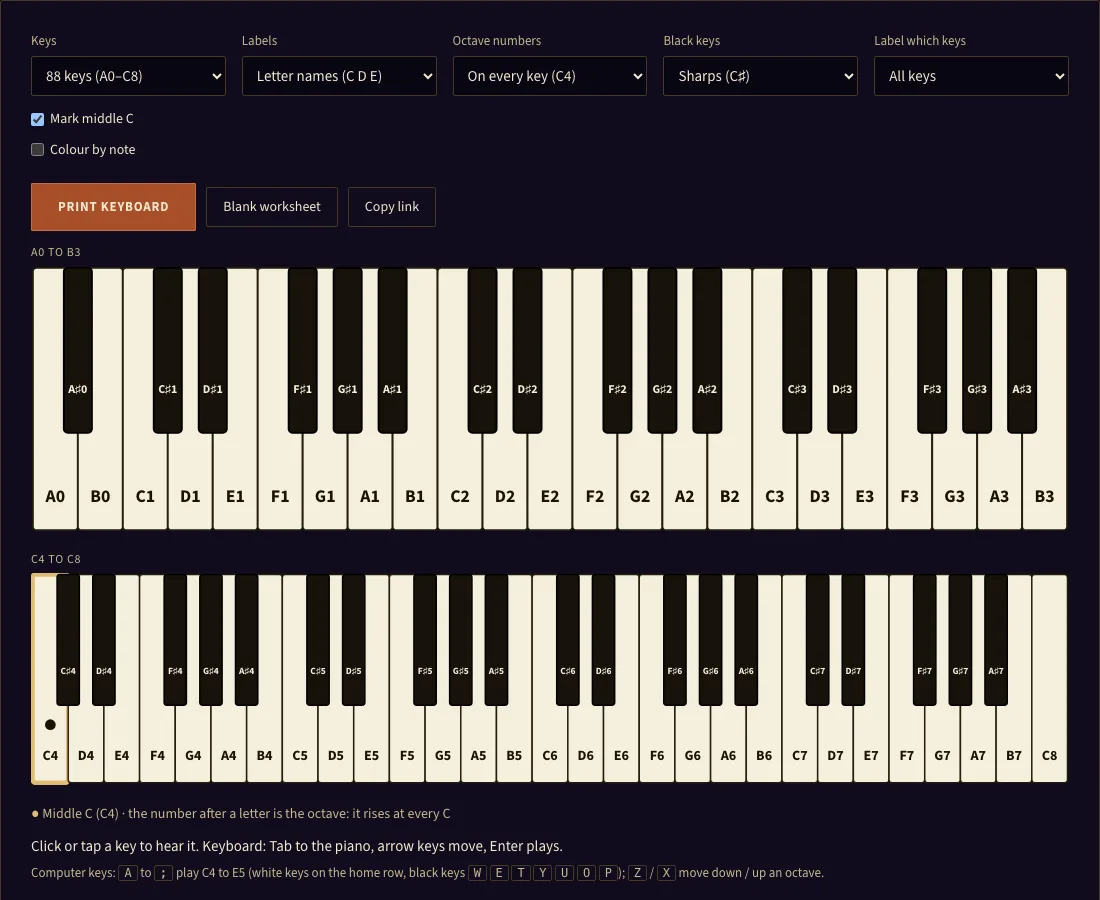
How to use the Piano Keys Labeled tool
- Open the tool at the top of this page.
- Set Keys to the size you need. The default is 88 keys (A0–C8). The other options are 25, 32, 37, 49, 61 and 76.
- Set Labels to Letter names (C D E), Solfège, fixed do (Do Re Mi), or None. None draws a write-in line on every key.
- Set Octave numbers to On every key (C4), On C keys only, or Off.
- Set Black keys to Sharps (C♯), Flats (D♭) or Both (C♯ / D♭).
- Set Label which keys to All keys, White keys only, or C keys only.
- Tick Mark middle C to add a thick outline and a dot on C4, with a legend line. Turn on Colour by note for a pale tint on each letter. The colour stays light enough to read in grey.
- Click Print keyboard. The chart prints in landscape.
To print a blank sheet, click Blank worksheet. It sets Labels to None, then you print. Click or tap any key to hear it. The readout shows the note name, key number, MIDI number and frequency. You can also use the computer keyboard to play notes. Copy link saves your settings to the URL so the same chart opens with the same options.
What are the names of the piano keys#
The white keys are named with the letters A to G. After G the names start again at A, so the order is A B C D E F G A and so on. The black keys take their names from a neighbouring white key, with a sharp (♯) or a flat (♭). In solfège, the white keys are Do, Re, Mi, Fa, Sol, La and Si. Fixed do ties Do to C, so each syllable always lands on the same key.
How do you find middle C on a piano#
Middle C is the C key near the centre of a full keyboard. In scientific pitch notation it is written C4. Look for a group of two black keys. The white key directly to the left of that pair is C. On an 88-key piano, middle C is key number 40, counting from A0 as key 1.
What are the black keys called#
The black keys are called sharps or flats. A sharp raises a note by a half step, and a flat lowers it by a half step. The black key between C and D is both C♯ and D♭, which is one key with two names. Each octave has 12 keys: 7 white and 5 black. The black keys sit in groups of two and three, which helps you find your place.
How many keys does a piano have#
A standard acoustic piano has 88 keys, made up of 52 white and 36 black, running from A0 to C8. Many portable keyboards have 61 keys, which run from C2 to C7 and include 36 white keys. Smaller keyboards have 49, 37, 32 or 25 keys. The tool offers each of these sizes with the usual range (49 keys C2–C6, 37 keys C3–C6, 25 keys C3–C5); makers differ on the smaller sizes, so check the lowest key of your own keyboard.
What do the octave numbers on piano keys mean#
An octave number tells you which octave a note belongs to. In scientific pitch notation, the number follows the letter, as in C4 or A4. The number goes up at each C, so C4 to B4 is one octave and the next C is C5. A4 is tuned to 440 Hz, which is the standard reference pitch. Octave numbers help when you match a note on the staff to a key.
How do you label piano keys for a beginner#
Start with the C keys. Turn on Mark middle C and set Label which keys to C keys only, so the learner has one clear landmark. Then switch to All keys so the learner can see how the white keys follow each other. Add black keys last, using Sharps or Both. Many teachers prefer letter names first and solfège later, or the reverse, depending on the class. For easy, simple piano notes, a 25-key chart from C3 to C5 is enough for most first songs. Left hand piano notes usually sit below middle C, in octaves 2 and 3, which is the bass clef range. There are no special minor notes on piano: minor and major describe scales and chords, and both use white and black keys.
Frequently asked questions
Is it free and does it need an account?
Can I print it?
Can I use the printouts commercially?
What does Mark middle C do?
What is the difference between letter names and solfège?
Why are my black keys blank?
Why does the 88-key chart use two rows?
Updated