
Virtual Drums
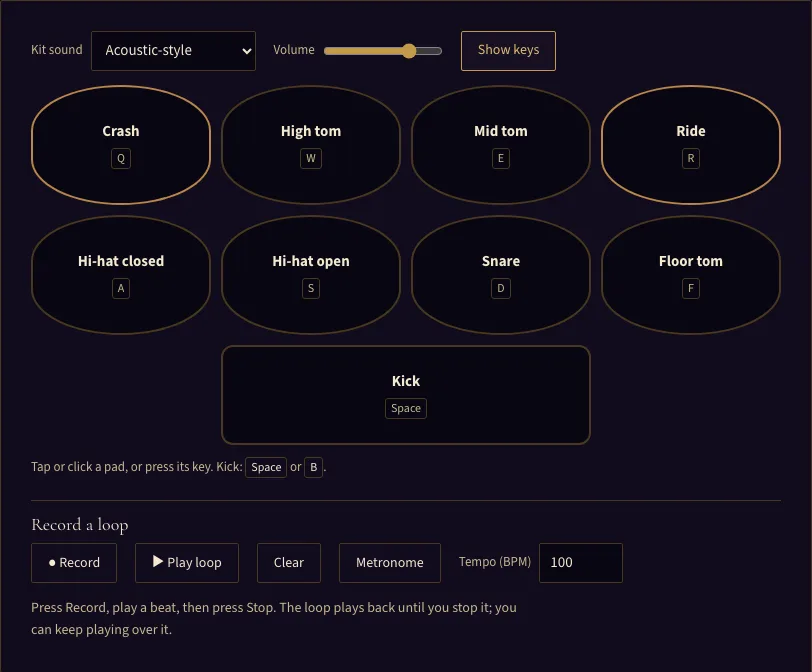
Tap or click a pad, or press its key. Kick: Space or B.
Record a loop
Press Record, play a beat, then press Stop. The loop plays back until you stop it; you can keep playing over it.
Play virtual drums online: a free nine-pad drum kit for mouse, touch or keyboard, acoustic and 808 sounds, with a loop recorder and metronome.
About the Virtual Drums
Virtual drums is a free drum kit online that runs in your web browser. Click or tap the pads, or press their keys on your keyboard, to play a nine-pad kit with kick, snare, hi-hats, toms and cymbals. There is no sign-up.
Every sound is made live in the browser, so you can play a drum set online without downloading any audio files. Several pads can sound at once, so you can play fills and grooves with more than one limb or key at a time. A built-in recorder captures your beat as a loop that you can keep playing over, and a metronome and tempo control help you keep time.
Use it to practise rhythms, test ideas before you sit at a real kit, or simply enjoy a virtual drum set on a laptop, tablet or phone.
How to play the virtual drums
- Open the page and click or tap anywhere on it once. Browsers keep sound off until you interact with the page, so the first click or key press may start the audio.
- Learn the layout. The top row is Crash (Q), High tom (W), Mid tom (E) and Ride (R). The middle row is Hi-hat closed (A), Hi-hat open (S), Snare (D) and Floor tom (F). The bottom pad is Kick, played with Space or B.
- Play a pad by clicking or tapping it, or by pressing its key. Press several keys together to hit more than one pad at once.
- Press Show keys to hide or show the key labels on the pads.
- Adjust the Volume slider to suit you.
- Choose either the Acoustic-style or the Electronic 808-style kit sound.
- Switch on the Metronome and set the Tempo between 40 and 220 BPM if you want a click to play along with.
- Press Record, play your beat, then press Stop. Your recording becomes a loop that starts playing straight away, and you can keep playing on top of it. Recordings can be up to 30 seconds long.
- Use Stop loop and Play loop to control the loop.
- Press Clear to remove the loop. Recording again replaces the existing loop, because the tool holds one track only.
The keyboard keys are the fastest way to play, and the Show keys button lets you switch the labels on or off as you learn the layout.
What are the parts of a drum kit?#
A drum kit is a set of drums and cymbals that one player controls with both hands and both feet. Each part has its own sound and job, and the virtual kit gives each job its own pad.
The kick drum is played with a foot pedal and gives the low beat that anchors the groove. The snare is the sharp backbeat drum, the crisp hit that sits between the kick hits in most pop and rock patterns. The hi-hat is a pair of cymbals that the drummer opens and closes with a foot pedal. On this tool, the closed hi-hat cuts off a ringing open hi-hat, which mirrors how a real pedal works.
Toms are the tuned drums, usually high, mid and floor, and they are used for fills and melodic patterns. The crash is a loud accent cymbal, often hit at the start of a section. The ride is a cymbal that carries a steady pattern through a song.
How do you play a basic rock beat?#
Most pop and rock songs use a four-beat bar that you can count as 1 2 3 4. A simple pattern uses three pads. Keep the closed hi-hat (A) going steadily on every count, or on every half count for a busier feel. Play the kick (Space or B) on beats 1 and 3, and the snare (D) on beats 2 and 4. The snare on 2 and 4 is the backbeat, which is why the pattern feels like it pushes forward.
Once that feels steady, add a crash (Q) on beat 1 of a new section, or play a fill on the toms (W, E and F) in the last beat of a bar. Turn the Metronome on and set a slow tempo, such as 70 BPM, then record the pattern and listen to it back to check your timing.
What is the difference between this and a drum machine?#
Virtual drums is a live instrument. You hit pads in real time, so your timing and touch shape the sound, and you can record what you play as a loop.
A drum machine, such as the Beat maker, is a step sequencer. You click steps on a 16-step grid to place each sound, and the tool plays the pattern back from start to finish. Nothing is played live, so you can place each hit exactly where you want it.
Choose virtual drums when you want to perform and record by feel. Choose the Beat maker when you want to build a precise pattern step by step.
Frequently asked questions
Is the virtual drum set free to use?
Why is there no sound when I first press a key?
Can I play on a phone or tablet?
What does the metronome do while recording?
Can I save or download my recording?
Are the drum sounds real recordings?
Updated